Translate

Monday, 30 March 2015

Creating Users in Oracle 12c

User Creation - 12c

Starting from Oracle 12c there are two kinds of users.

1. Common User

2. Local User

Common User


1. Should Created as CDB$ROOT . You have the option to specify if you want to create the user in all container databases.

2. Username should be prefixed with c##

3. If we specify default tablespace, Quota etc we should ensure that they are present in PDB's as well.

Local User


1. Only local to a particular PDB

2. It will not be created in other databases.

3. We should alter the session and create the user.


Common User


CDB_USERS dictionary displays user information whether it is a common user,con_id etc.


CDB_USERS Dictionary


Connect Common User to a PDB


Even though you have granted create session to C##CHANAKYA you are not able to connect to pluggable database.  Why?

This is because the user is not having create session privilege for that PDB. Make sure you use the below command to grant the privilege.

grant create session to username container=ALL;

.


Local User

Now lets create a common user in PDB and check


We cannot connect to other PDB's because user is only local to that particular PDB. In our case

India user was created only in ORC2 hence we cannot connect to ORC1.


By using the CONTAINER clause we can specify in which particular PDB users should be created.


Connecting to PDB using Sqlplus

How to connect to PDB using sqlplus ?

We can connect to PDB's in 12c using two methods.

1. sqlplus username@PDBNAME

2. sqlplus username/password@HOSTNAME:portno/servicename

To connect as sys as sysdba

1. sqlplus username/password@HOSTNAME:portno/servicename


sqlplus username@PDBNAME


sqlplus username/password@HOSTNAME:portno/servicename


To connect as sys as sysdba


Datapump and Oracle 12c PDB - ORA-39087

Datapump using PDB

If you are planning to export some data from PDB you need to make sure you have TNS entry in TNSNAMES.ORA. This is a prerequisite.

Lets now connect to PDB using expdp utility.


This is because there is no DATA_PUMP_DIRECTORY for the PDB.

Lets create a directory at the OS level and also at the DB level.


Lets test now by explicitly specifying the directory parameter.


Now the export is successful.

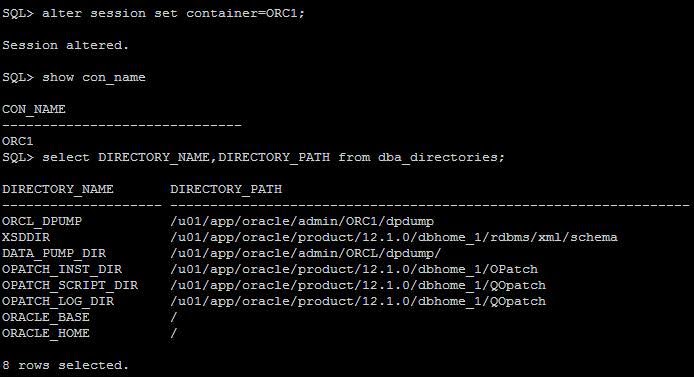
The New directory will only be displayed only in the corresponding container database.

Below screenshot will explain you the difference.


Connect to  the Container database ORC1


Sunday, 29 March 2015

View the history of PDB startup time

How to view the history of PDB startup?

We can view the startup of PDB's using DBA_HIST_PDB_INSTANCE


How to View the Datafiles in PDB?

How to view the datafiles & tempfiles in PDB?

If we have created PDB's the easiest way to view the datafiles in using v$datafile.


We also can connect to the CDBROOT and list details of all datafiles which include PDB's as well.


To view the tempfiles of both PDB's and CDB's we can query v$tempfile as we do in other releases.


In case if you want to view only the details of individual PDB's you need to set the session to that particular database and view them. 

12.1.0.2 - Pluggable Database Automatic Restart

Pluggable Database Automatic Restart - 12.1.0.2

In Oracle 12c if we shutdown or startup the database only the container database starts in READWRITE mode. All the pluggable database remain in MOUNT state.


We need to use ALTER PLUGGABLE DATABASE ALL OPEN to open all the PDBS.


As of 12,1.0.1 to automatically start the PDBS in READ WRITE mode we need enable a trigger .

In 12.1.0.2 Oracle has introduced a new way of starting the PDBS.

 alter pluggable database PDBNAME save state;

Lets test the feature.


To save the state of all PDB's we can use the below command

ALTER PLUGABBLE DATABASE ALL SAVE STATE;


Let's shutdown the database and check if PDB's open in READ WRITE Mode automatically.


All Pluggable Databases have automatically started in READ WRITE mode.

We can view the DBA_PDB_SAVED_STATES to view the saved state.

select CON_NAME,INSTANCE_NAME,STATE from dba_pdb_saved_states;


In case if you feel that you need to remove the save states we have an option for that as well.

ALTER PLUGGABLE DATABASE ALL DISCARD STATE;

Lets test this as well.


How to Open Pluggable database in 12c?

How to Open Pluggable database in 12c?

1. Start the Database


2. Check the Status of the PDBS and start up using

ALTER PLUGGABLE DATABASE ALL OPEN;